2D Game: Level Designs

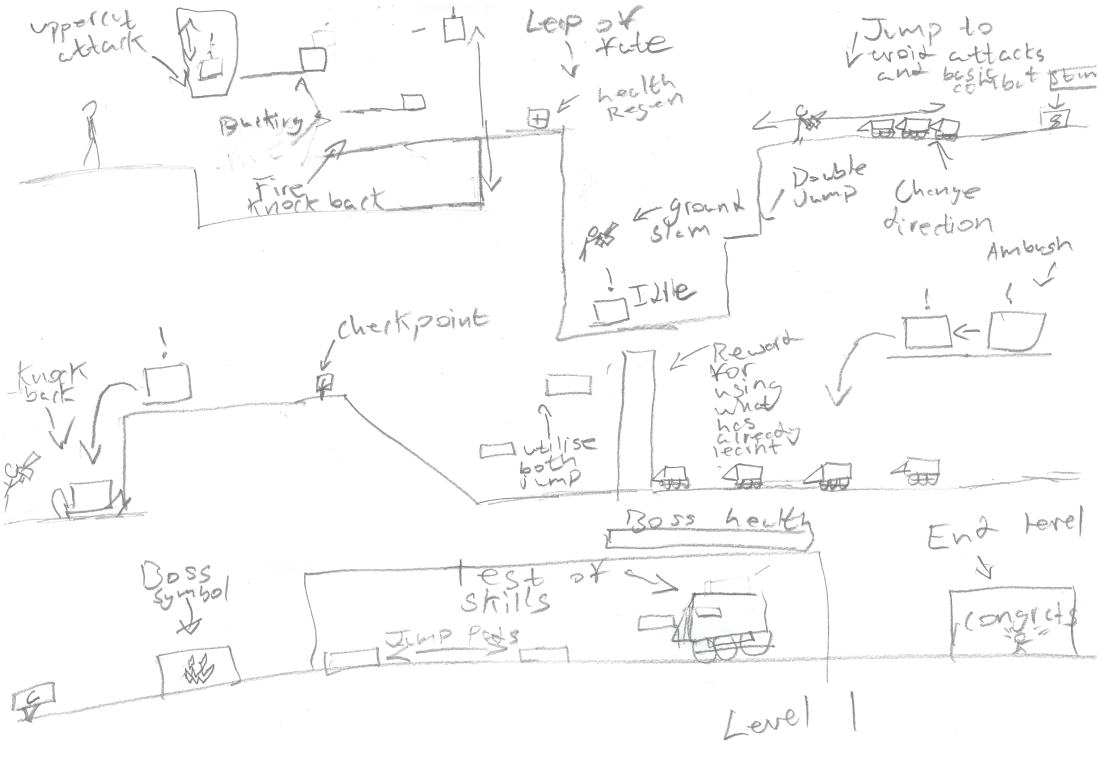
Level 1 design
Level 1 Design
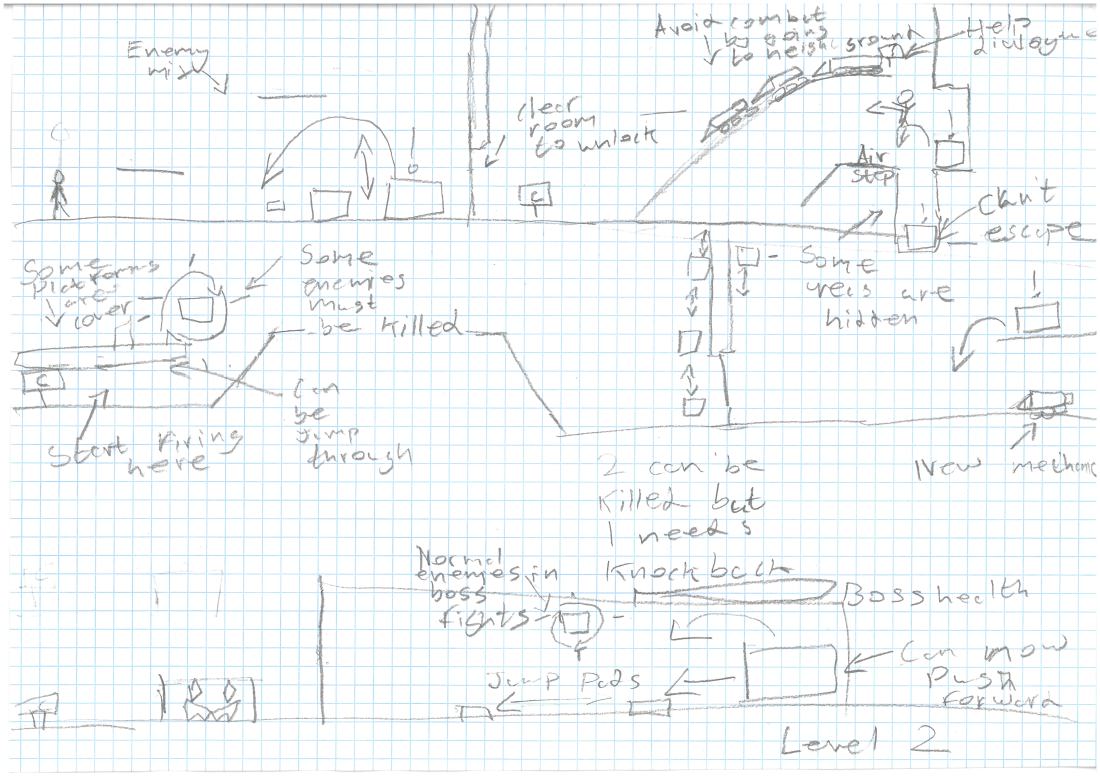
Level 2 design
Level 2 Design


These designs are a post to work around the character and how he works. I chose this level layout, because I was using Mario’s level designs as a guideline. The player would learn throughout the game how it works. I’m going to focus on the main character’s normal attack first and a very basic enemy.

2D Game: Character concepts

Character Designs

These three characters are concepts of a character I had in mind. The first character was a really rough sketch to get an idea of what it may look like. In wanted a grappling hook and sword for tools. The second one was more focused on the sword and I kept in the eye, because I wanted it to glow when it turns into the giant version (if I have time and think it is worth putting it in). The third one went the complete opposite of the second look, this time going for a more childish/casual look.

The character I am probably going to make is a mixture of the 2nd and 3rd look.

2D Game: Character Idea Mood-board

The look of the character could be a mixture of the two fighters. The grappling hook on Scorpion could be used to move platforms.

The companion if added could be slightly demonic, but also a human like figure robot.

The character could have an AOE laser ability that could get rid of waves of enemies or something similar to that. The main weapon of a dagger could be supercharged into a super futuristic dagger that deals more damage and reaches further.

Enemies could compliment the character by possibly changing a normal attack into a combo if hit on the correct enemy or hits a combo.

The suit the character uses could glow, which could be used for passing pitch black areas.

Enemies could apply debuffs to you by fattening you, which slows you down, but maybe increasing your damage temporarily.


2D Game: Game Idea and Them Mood-board


Look at these I decided that I was going for a sci-fi based action game, with the main weapon being a normal weapon and letters scattered around the level to give you access to a super weapon that is a futuristic melee weapon.

The character may also have a companion, but that would be late development if I decide to do that.

The enemies and character could interact with the environment.

Enemies could have little faces or unusual animations to make them look more alien or robotic like.

Bonus levels could be a thing and was thinking of a retro style look, which could be used to obtain power-ups, health or extra lives.

Putting assets in the background would increase depth and could be useful to show I’m in space or something.

2D Game: Learning About Projectiles

The images above show the projectile blueprint for firing and an example of it in action. We originally did normal projectile, but I went through this tutorial in my spare time: Video link.

I did this because, I wanted the player to be able to be able to fire without breaking their keyboard or finger.

We did encounter a problem that the character didn’t rotate, this was due to disabling the tick event to the tick animation blueprints, so it only shot in one direction and not left and right.

2D Game: Starting Up a Level

We went through some discussion about player collision and that it is better to chose the forgiving than the unfair option to the player when it comes to collision at least.

collisions.PNG

The collision on the right would infuriate the player and make them not want to continue, while the other one makes the player think they died, but it was fair.


We started too create a level, after we learnt the navigation of the UE4, using the 2D SideScroller Blueprint. In this we have removed the player animation and added a white ball in the Viewport of the character. This didn’t remove the animation, because the blueprint controller was still receiving a sketchbook of animation. Once the link was broken, it removed the animation. The ball wasn’t lighted and all I needed to do was click build and then it received lighting.

We then included sound affects to when the player jumped and for me landed, I got the sound affects here: Sound bible (Be careful when using).

The next step was adding in a reset button and reset collision, which was done by just reopening the world:
2D Game: Mario, Sonic and Mega man Comparison Analysis

The similarities on the three are:

  • Good level design – Each level is designed around the character, which makes them feel more involved in the world.
    • Mario –  Mario’s specialty is blocks, so the level is designed around blocks.
    • Sonic – Sonic is a speed character and the levels are designed for getting momentum.
    • Mega Man – Mega Man has a long range weapon, so all levels are designed to have long range obstacles and enemies to challenge the player.
  • Weapons – All characters use there self as a weapon.
    • Mario – Jumps and stomps.
    • Sonic – Spin dash and jumping.
    • Mega Man – Blaster.


The differences are:

  • Enemies – The enemies for the game are specifically tailored towards the characters abilities, but in different ways.
    • Mario – Mario has simple enemies, that he uses to help himself out.
    • Sonic – Enemies in Sonic are very basic, but serve the purpose of making the enemies difficult, but not to slow the player down too much.
    • Mega Man – All enemies in Mega Man interact with the environment, which therefore makes the level more difficult.
  • Environment – The environment in the levels are different and serves the purpose of making the character feel like they belong in that world.
    • Mario – Mario has a world that is medium size, but Mario takes his time.
    • Sonic – Has massive level, but sprint through it.
    • Mega Man – Box rooms, but multiple of them to make a level.