2D Game: Obstacle Concepts

This slideshow requires JavaScript.

I used most, if not all of these concepts. I drew these concepts before implementing them into the level, but I didn’t do it at the beginning. I will from now on, unless something says otherwise, make a function first, then squeeze every use out of it, then add another one and repeat the cycle. I won’t be able to do this for certain features a lot, until I add something new in, for example: Movement, only left right, crouch and maybe jump, but as soon as I add in an enemy, the possible uses skyrocket up and can be utilised in countless ways.

The obstacle concepts are designed to first introduce the player to a use of a feature and then to re-introduce it, but in a slightly modified way. For example: The mine that goes off when the player first encounters it and it can be avoided by jump up onto a platform. This is then re-introduced to the player by a fall that starts them in a new area where the event repeats again, but the area is not the same, so it won’t just feel like a copy and paste, even though it somewhat is.

My only regret with these concepts, is that I didn’t start them earlier in the project, it would have help tremendously.

As a side note, I’ve noticed that in myself that I have the potential to be an amazing game designer and other things I am good at, but that I have been going through it all wrong and just makes me look like I don’t know what I am doing or doing it too slowly, which is partly true, I just didn’t know the most effective methods.

2D Game: 2D Platformer Project Evaluation

In this post I will go back through the last 1-2 months of work I have put into this project and say what went well and what didn’t. I will also reflect on any area I think I need improvement in.


Planning

Mood board Character and 2D Game: Game Idea and Them Mood-board are the first two blog posts when I first started to plan what the game was going to be about and what the character was going to be like. I didn’t really use these ideas, because it was an overshot of a game design relating to my abilities and was just a starting point. I will take this error into account for any further game designing I am going to do.

Later on I made level and character designs as you can see below ( Blogs: 2D Game: Character concepts and 2D Game: Level Designs):

I had an amazing idea for a character in my head and that would be great for a AAA game, but this was more of an indie short deadline game, so it wasn’t a great idea. I made a bad 16 by 16 bit version of him, but I had to take out the chain. I wanted him to do massive fluent combos mixing his dagger or sword with a long chain that mixed up gameplay, but this probably would have been to difficult for me at this stage and definitely for the time-span; I had of 3, 4 or 5 weeks I think?

The look to me didn’t really matter too much, I just wanted it to have very cool mechanics. I decided to just use a sword, take out the sword transformation and simplify the character.

If I did this again, I would first start with very simplistic characters and move sets, then add more if I had time.

The level was designed around just the sword attacks and jumping. I kept 3x jump, because I already had it programmed in. The level designed was inspired by Mario, in that letting the player learn slowly through the level mechanics and not just rush everything in.

The problem with the level design is the same with the character; too many functions. I will also start off simplistic and then add in functions later on with the level design.


Change to plan

After realizing I didn’t have much time left, I took my teacher’s advice and stop trying to make mechanics that would work with my character and just make a level that utilises the mechanics I had already and try to squeeze every aspect I can out of them. Here is a link to the blog post for more detail: 2D Game: New Plan

Part of me thought this would make the game dull, boring and not worth playing, but it seemed to be the opposite, because people and myself actually enjoyed playing the game more. I guess it is true what someone said to me, even for games, “People want the same but different,” this meaning just re-skins and altered slightly. You really do learn a lot through experience.

I sat down and started to make use out of two mechanics in  the most ways possible; mines and jump-through platforms.

Even though this was great, I still needed to add some mechanics later on to get things working correctly. Now I realise that is better than working on the mechanics before the level, because after you’ve finished all the mechanics they could become useless and leave you without a level.

When going through this again, I now know the following:

  • Simplicity first – First start off with a simple concept and once that is achieved, then expand.
  • Squeeze a mechanics functionality: Use a mechanic to all it’s use and then add more and start combining them.
  • Not all mechanics are technical – You can make a great game without knowing how to program in depth, if you are a great game designer and artists. You can use colours, sounds and videos to influence a game. A great example of this is The Witness.
  • More mechanics does not mean better – No matter how many mechanics are in a game, the game will be bad if it doesn’t use them well.


Size

The size of the game might be big seeming I made the level layouts in a day, but it could have been bigger and better, if I didn’t spend time making the laser.

I thought a game was about functionality and then level designs, but I couldn’t have been further from the truth, it is level design and then functionality, well it isn’t that black and white, because you need some functionality before level design.

From now on I am thinking of making a levels that makes use of a mechanic and then the following level introduces a new mechanic. Aka mechanics will be introduced one by one and then a finally of all them at once, instead of jumping straight from point A to point Z and hoping the player understands what each mechanic does. I also learnt that reusing sections of a level, but making them slightly different will make a player feel accomplished or not punished for figuring it or not figuring it out. For example: A 2x pit fall. The player may think it is a secret passage, but when they realise it is a trap, they can use this knowledge in later sections.


Overall results and what I have learnt

The overall result does seem a bit rushed, because it mostly was, but I have learnt so much throughout this project. This is what I’ve learnt:

  • Good level design – I’ve learnt what makes a good level design and what makes a bad level design. A good level design makes use of all tools and brings back challenges, but normally with a twist, while a bad one doesn’t.


  • Simplicity over complexity – If you can’t follow what is going on, there is no way an average player will.


  • Multiple small thrills are better than one big one – Don’t waste the player’s or your time making only one gigantic thing, work in small steps and that will eventually come, granted maybe not as spectacular, but it could have more impact.


  • Let players use just learnt knowledge – There is no point in teaching players something they aren’t going to reuse and just felt their time has been wasted.


  • Trick players into thinking they figured something out – Putting small obstacles in and a way to get past it all by using learnt knowledge that you deliberately put in there but not in clear sight, will make the player feel like they figure something out that was not apart of the game. Example: Wall jump to jump over enemies, but not deliberately telling them that’s how you get passed.


  • Some mechanics need other mechanics – Some mechanics need other mechanics to work, but you shouldn’t really stress about it until you get to that point.


  • Concepts before continuing – A good game development needs you to sketch out ideas of how to use mechanics before continuing, otherwise you will waste more time later on. Look at all the trendy games for examples. Quite a few have a very simple mechanic or/and feature, but they utilise it in it’s entirety. The next most popular game is not necessarily a fast action, heavy develop game, it could just be very simplistic, but addictive and fun game, example: Flappy Bird; stupidly simplistic, but boy was it popular.


I now know what makes a good game and what doesn’t and I now know what I shouldn’t and should do during development. From what I’ve learnt these are the order from most to least important parts of a game development:

  1. Level Design
  2. Gameplay
  3. Story
  4. Functionality
  5. Graphics
  6. Sound
  7. Particle effects
  8. Refining
  9. Tutorials
  10. Juiciness
  11. Voice actors
  12. AR
  13. VR

Note: These are interpretations and not facts. All games have different development needs.

Something I can say for sure is, focusing on just 1 or 2 of these areas and building it up like it was your baby and going through all the crucial stages will make a game that will leave an impact on at least one player in the world as long as you put in the effort and emotions into making the game come alive. Think of game development as a journey and everyday is a whole new journey and it will no longer be chore to finish it, it will be an accomplishment and an end to the road, you will then struggle to just let go and with some games you won’t need to for a while, for example: WoW (World of Warcraft).

2D Game: Platform Fixed

When creating the platform I had a game breaking error. The platforms would disappear when the engine would first pop up. I would have to keep deleting and undoing the deletion of the TileMap component. This means all challenges that required the platform to work, would no longer work. I fixed this issue by re-adding the Paper Sprite components back in and changing the code to get it to start working. Using TileMaps as a component when first writing the blueprint is a good idea, because it means less can go wrong, but after the blueprint is finished, it is best to replace it with paper sprites, because the game won’t crash if you try to move these sprites, but it will with TileMaps.

In short, currently do not use TileMaps as an Actor blueprint component as the final build, unless they have been fixed by then.

2D Game: Varity of mines

trap Variety

The way the mines I had setup did not reach the player and the area I wanted it to. To fix this issue, I duplicated it and changed the coordinates of all the mines to fit certain needs. Like one that needed to reach the player before it jumped, one that didn’t activate when player is behind it and so on. I also created an actor just to stop bullets from going through walls, because it would be unfair. I did want to do it to the tileset itself, but couldn’t figure out how, so this was the next best option.

The problem with both of these fixes is it could slow down the game. The extra con for the trap attack variety is the multitude of fixing if something goes wrong, because the likelihood is, if one thing went wrong in one, then it probably has in the others, granted this is a small con, but it is really bad for any deadlines that are needed to be met.

2D Game: Level Look

Level sizecongradulations level

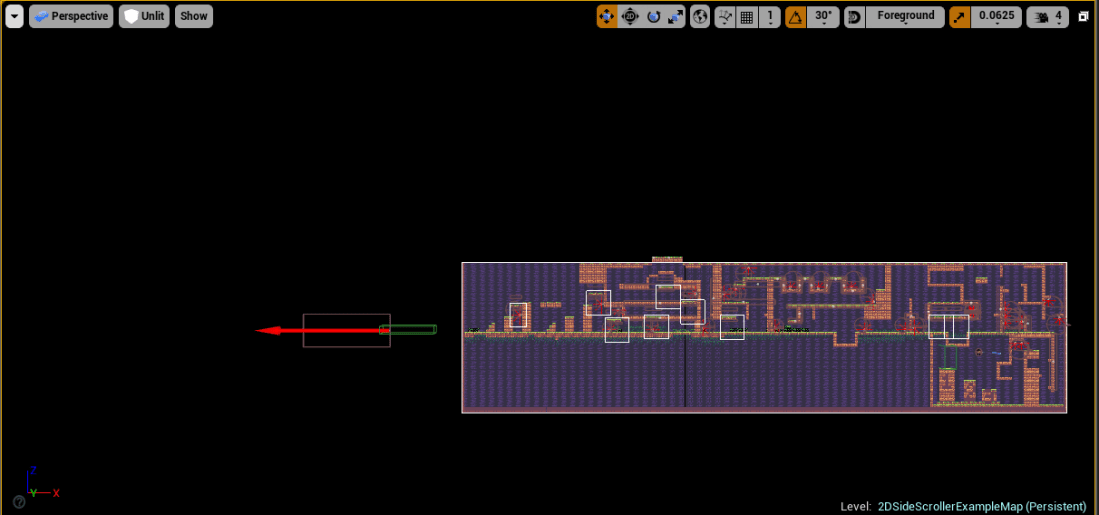
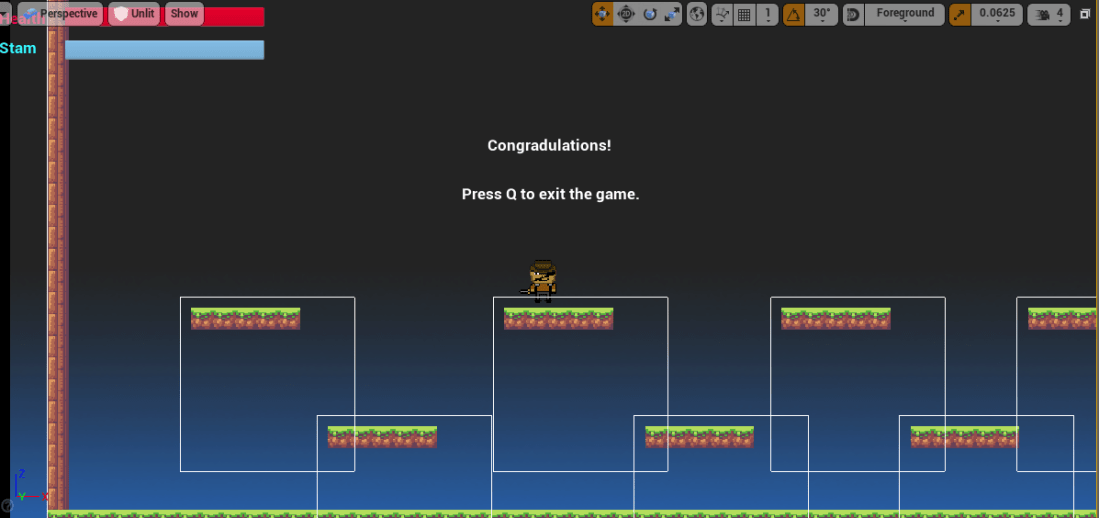
These screenshots of the game are the main level and the ending demo level. The first level is made up of just two main mechanics; jump-through platforms and mines. There is another mechanic, which is bullet stoppers, but they aren’t a main mechanic, it is close though. The second level is just an end of demo level that lets you jump around, test the platforms with more freedom and I would probably use this as some type of bonus level with lava on the ground, your character automatically running, bonus pickups like extra lives, automatic direction changers and more.

I made both of these in 1 day, which I’m shocked with myself. This proves to me that using 1 mechanic in as many ways as possible is a very affective technique. Plus mechanics don’t all need to be blueprints, for example: a maze with colours throughout the level that are used to help you get through the maze. For example: blue = left, red = right, yellow = forward. No extra scripting or programming needed, just art and design. I wish I realised this when making the level, because this could have been a nice, fun and simple mechanic to include.

2D Game: Stop bullet on Platform Collision


An extra mechanic I wanted to add was bullets destroying on platform collision, I did this because, it was super unfair to the player if bullets went through walls and could hit them and make a game over, this would infuriate players if done incorrectly, but if done correctly, could make the game more fun, but for my game, I wanted players to get into cover.

I originally tried to script it into the bullet itself by gathering the reference from the platform and specifically target the platform itself and not the collision boxes, but unfortunately no matter how hard I searched and tested, I could not get this working. Then I had an amazing thought; because the platform has got a collision box and the bullet also does, but the bullet is at the same location, why don’t I target the platform in the platform blueprint. This was exactly what I needed, I made the code and it worked and it had way less steps to it. All I had to do was begin an EventOnComponent BeginOverlap (Platform) and then on collision cast to the bullet and delete the bullet itself.

From this I learnt that sometimes to get mechanics to work you need to make more mechanics, but this could get out of hand, so try to focus on mechanics that don’t require too many mechanics in. There isn’t really a way to be certain it needs a lot of mechanics, but maybe trying to think of as many ways as possible the mechanic can be used, even if you don’t use them, might tell you how many mechanics roughly will be needed to make it work in the way you want to.

Example a gun: shooting, recoil, reload, ammo, power, fire rate, switches, portals, charge shots, hitting enemies, hitting objects, explosions, life drain, poison, haste, fire and ice, but only 5 of these mechanics are most of the time necessary for a full functioning game; shooting, power, fire rate (fixed or custom), hitting enemies and hitting objects. The key is not to develop the ideas, unless you know you are going to use them. This idea and planning down could take a few hours, but it could save you weeks, months and possibly, but unlikely years of time developing a mechanic or set of mechanics that are useless or not needed, because they don’t function well, have very limited uses, etc.

2D Game: Traps Made

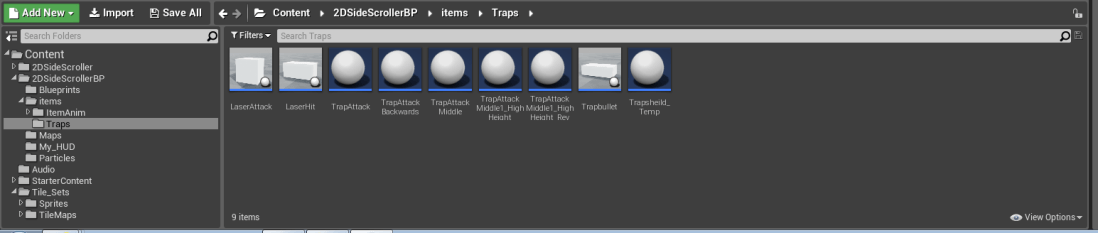
Here are the two traps I made for my game, the one on the left is a mine that shots in a fan like pattern, I did this by using this tutorial as a guide: 2D Platformer trap tutorial. I then used my knowledge from the tutorial and my own knowledge to make a giant laser attack. It didn’t go quite as plan, because I wanted two collisions, with the first that triggered the event and the other collision I wanted the laser to come out from, but it used the first collision for both. I even specified the second location for the transform point, at least I think I did, can’t remember. Anyway it didn’t matter that much, so I fixed an issue I was having; wasn’t shooting in right direction and called it a day.

Note: Sorry for the delay, I was very busy with other work.

2D Game: New Plan

With the realisation that the deadline is closer than I thought, I decided to make a new plan on what I should do with what I got. (I have two new traps now, update sometime next week).

New plan:

  1. Use traps, features and mechanics I already have to make a level that is fun to play (hopefully).
  2. Add a score system, for example: score of 1,000,000 that goes down by 1 every 0.1s, total time 27h aprox, which stops at an end goal.
  3. Find out how to record a high score and add it in the game.
  4. Add more mechanics if I have time, for example a simple one, rock platforms block laser beams that standard platforms don’t
  5. Tweaking (Very very unlikely to happen, seeming I only have a week)


If I had more time, I would make use of the melee combat mechanic, which is currently 1 normal stab attack and flesh it out more by adding combos, abilities and juiciness, like particle effects on hit.

2D Game: Jump Through Platforms Added

The process of making these platforms were through these two videos:

As well with some of my own knowledge and problem solving to get it working in 2D and tweaking it so it was better. For some reason I couldn’t use a Mesh of my character to tell the location, so I had to work around that and find another way.

The platforms do currently have issues, but not completely game breaking, just somewhat. I added these in, because I wanted platforms I could jump through.