Evolution of the concept art

Front view:

I originally traced over the first concept art I made and traced it out, correcting any mistakes and changing the arms to only one non-human one. This in my opinion and some others increased its look and made it look more like Tetsuya Nomura’s art style.

I tried to scan it in, but it looked really bad, because I used tracing paper and not ordinary paper. I didn’t realise this would have made a difference, but it did, so I redrew it, smoothing out the lines on a Light Box.


Back view:

After doing the front view, I went on to the back view. I made the character’s head bigger from this point forward, because it was too small and didn’t fit Tetsuya Nomura’s art style, the head was about 50% bigger than a typical head, double is too much and regular is too small.

This was the easiest and hardest side to do. The face and body was really easy to draw, but when it came to the hands and feet were a pain to do. I also now realised I did the hands the wrong way around and should change sides, I flipped the hands, but not their composition on the paper.

Once I drew it all out I scanned it in and redrew the character on a Light Box to smooth out the character and make it more neat.


Side view:

This view was extremely difficult to draw. The nose difficult to get in the right place, the trousers were difficult to get to look right and I event got the character’s rotation incorrect. This took me quite some time to get everything correct.

After it was drawn correctly from the right angle I scanned it in and redrew it on the Light Box to smooth it out, because it really needed it and then scanned it in.

First two concept art

When creating my character concept art for Kingdom Hearts, I made the character on the left. It looked good, but didn’t really fit the Kingdom Hearts series, because there was well too much going on. The original had skeleton arms, detachable arms, which changed what the character could do and his abilities and just in general got really complicated.

I changed my design to only having one arm from the Unversed Iron Maiden instead of the Prison Keeper’s one. I chose this arm for the ability for the character to hold a weapon and not get so complicated. Everything else in the image stayed the same thought, except now he has sleeves on his jacket.

Kingdom Hearts character concept art

I started to draw some character concept art in the style of Tetsuya Nomura for planing my character design for me in Kingdom Hearts.

I first started with Sora’s head and shoes, with Xemnas’ coat and King Mickey’s gloves all from Kingdom Hearts 2. I then started to think of character designs that would fit me as a person. I like magic, so I used the Mimic Master’s head, Iron Maiden’s hands for a first fighting style, because I like to use quick and strong weapons. Neku’s coat was used, because I thought it looked nice and Trinity Limit Armour’s leg was for speed and mobility.

I started to think about my personality next and thought that I was a mirror that reflects back what is received; if I get treated badly, I treat badly back and vice versa. So to achieve this I chose a well known character, which was riku and drew his whole upper half and drew Ventus’ lower half for light and dark above and speed and power for the lower half. It looked alright, but it didn’t seem right, so I changed Riku’s hands for Iron maiden’s hands, because they are weapons and I chose Terra’s bottom half, because it resembles strength.

I really liked the result I currently had and was getting somewhere. I then tried to make a heartless version that I think would resemble me more. I used the heartless Wight Knight, because to me it seemed mysterious. I used Sora’s shirt and jacket to resemble some light and Prison Keeper’s hands, because they seem to fit really well with Tetsuya Nomura’s art style of very long weapons and Prison Keeper’s weapon is his hands. The hands also give it a death aspect and I like the thought of death and not scared of it in any way.

For my next stage of concept art, I will be making a front, side and back view of the fourth concept art I made with long sleves instead of short, with the arms and hands of the fifth concept art to give it the aspect of life and death with the feeling of light and dark.

Why I’m going to emulate Tetsuya Nomura style

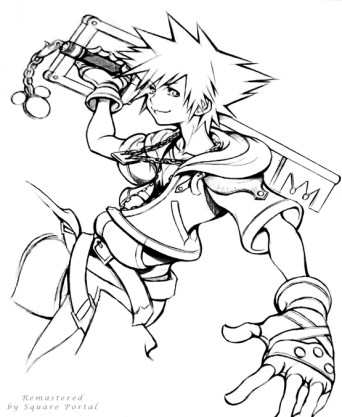
soraartworkresmastered

I have been a big fan of Tetsuya Nomura art style for quite a while, but never knew why, so I analysed this drawing by him and noticed why.

The drawing has a curve body and spiky hair. This gives more emphasis to the character’s head, I like this, because it draws me to the head and makes the body less distracting to what is going on. The way the character is drawn makes me feel more relaxed around him, even though he is in a fighting stance, this drags me in, because I don’t like characters that seem too aggressive.

The way he is dress tells me that he is ready for a fight, but doesn’t want to fight. Tetsuya Nomura normally uses a lot of belts in his drawings, which I don’t really like, because it doesn’t fit me, so I will use belts in my character, but not many. Tetsuya Nomura either uses a lot of belts or zippers currently in his drawings.

The character face has above average size eyes, which makes him seem natural, but not crazy big, which I don’t like, because it seems weird to me. The depth strokes Tetsuya Nomura uses gives the character a natural 3D look, which is what I like in a drawing.

All the characters Tetsuya Nomura normally draws are cartoon looking, which I really enjoy, because to me I connect cartoons with creativity and I love creative looking designs. The characters having overly large weapons adds to this fact, which I think is the reason I feel in love with his art.

Colours and what they mean

Colours and what they mean in an image:

  • Black (Positive) – Strong, luxury, space.
  • Black (Negative) – Mysterious (can be good), fear, emptiness, death, depressed.
  • White (Positive) – Purity, cleanliness, birth, peaceful.
  • White (Negative) – Death, cover-up, surrender.
  • Gray (Negative) – Cobwebs, old, confusion and decay.
  • Red and pink (Positive) – Love, sexiness, health
  • Red and pink (Negative) – Danger, war, sacrifice, blood and the devil.
  • Orange and brown (Positive) – Warmth, autumn, meat (brown)
  • Orange and brown (Negative) – Wildlife, splinters, waste
  • Yellow (Positive) – Cheerfulness, sand
  • Yellow (Negative) – Sick, sunburns, bees and wasps, dehydration, desert
  • Blue (Positive) – Ice cream, royalty, truth, calming, happiness (for me)
  • Blue (Negative) – Sadness, unexpected, cold
  • Purple (Positive) – Royalty, Mysterious, bravery
  • Purple (Negative) – rage, mourning
  • Green (Positive) – Nature, life 
  • Green (Negative) – Poison, disgust, horror, nerving, bitter, fear, illness, virus, bacteria, grossness, 

Illustrator Pencil practice

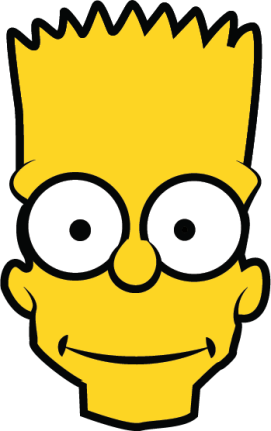
Bart in Illustrator

I went over an image of Bart Simpson in Illustrator to learn how the pencil tool works. I was somewhat use to the tool, but didn’t realise that by clicking on the point you are drawing from, it will change the curve line back to a straight line, which is really good to know.

The image consists of 3 background lines drawn with the pencil tool, 4 ellipses and 4 lines on the forehead drawn with the pencil tool. Illustrator seems to be a quick way to draw an image over Photoshop.