Analysis FMP: 10 Second Ninja

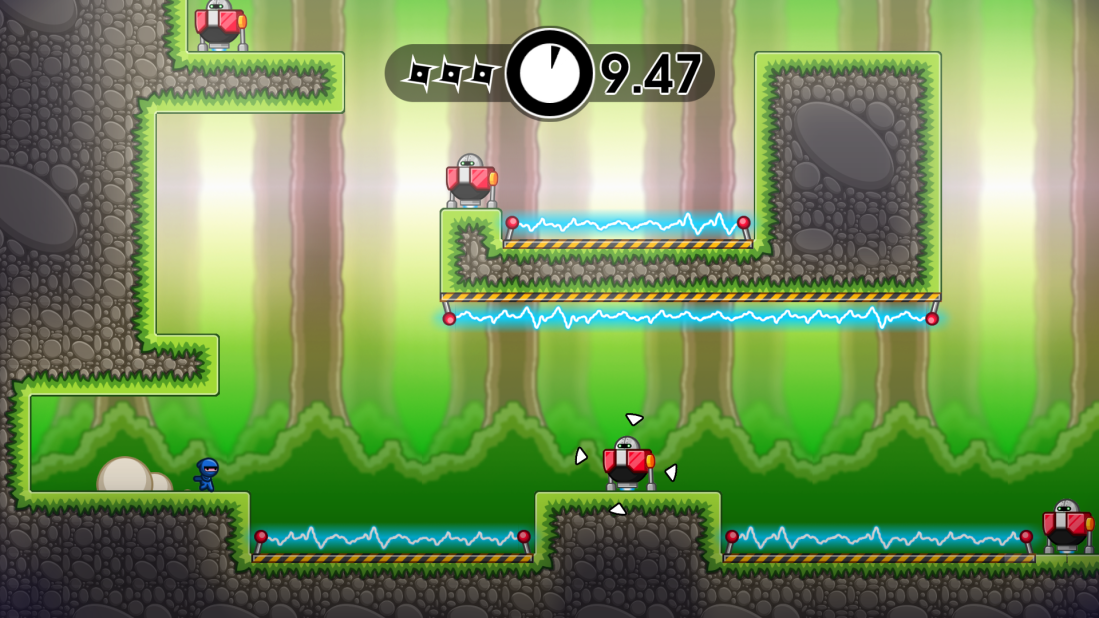
10 Second Ninja Level example.png

This is the video I used that analyse 10 Second Ninja: Analysis link. This video is lengthy, but thought it would help with my project, because it is very similar to my game. It’s a puzzle game, but not exactly the same.

I chose this game, because the mechanics are similar, the only differences are, my game have no melee attacks or time limit and 10 Second Ninja doesn’t have switches to my knowledge. Traps may come into my game, but that will be revealed within time.

Through this analysis I have learnt a few ways I can spice up my game, for example: I can utilise the puzzle game being a platformer by adding in puzzles that uses a jump mechanic to complete a puzzle.

10 Second Ninja uses a time limit of 10 seconds to make the game interesting and I think without the time limit, it wouldn’t be fun, which is making me consider adding a time limit in. By adding in a time limit, it can make a level repayable, because players would want to play a level over and over again to try to beat their previous high score. If I did add this, I would add it to the player’s HUD and reset it every level they enter into or press the reset button.

10 Second Ninja does the same thing as Thomas Was Alone did, which is making a puzzle that utilities the player’s mechanics and not making mechanics for a puzzle to work, aka make the mechanics first and use them as tools to make the puzzles. I am thinking about this quite a bit and will be including this recommendation into my level designs. A perfect example for this recommendation is 10 Second Ninja, because if it included switches, buttons and other obstacles to the puzzles, the puzzles would feel weird, but because they didn’t do that and made puzzles about movement and quick combat, aka using the player’s mechanics. The game feels right and how it should be, so it is more fun this way.

The puzzles are short and quick, which makes me consider if I should make my puzzles short, long or somewhere in between, because all 3 can work in their own way, but I think it is about consistency that makes the game fun, so I think the best puzzle length for me would be short at the beginning and slowly increasing the length and time of the puzzles throughout the levels.

This analysis has taught me to make puzzles around my mechanics, pick the puzzle length and keep it consistent throughout my game.

Game Mechanics FMP: What the Game Mechanics are

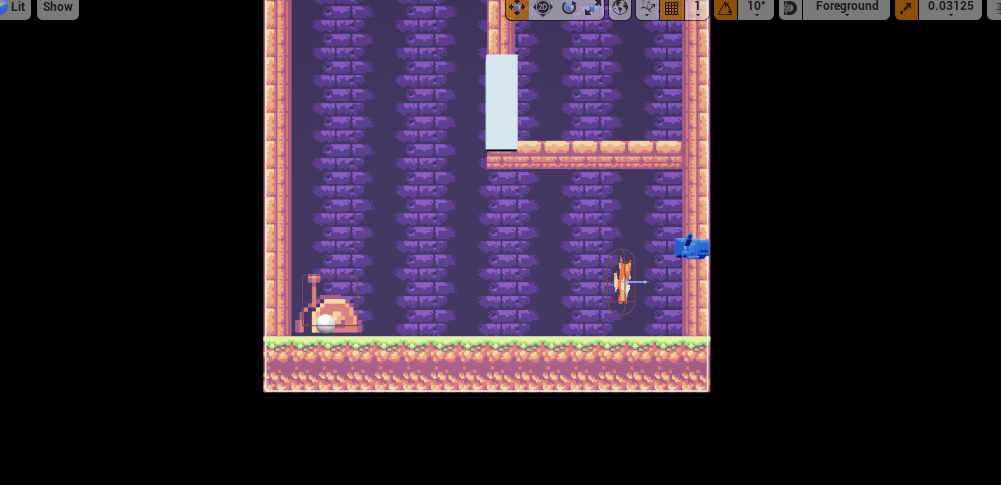
I can’t remember if I posted this anywhere, but if not this is the list of mechanics in the game and if it is currently in:

  • Movement (Applied) – Lets the player move around.
  • Shooting (Applied) – Lets the player use a gun to activate switches.
  • Switches (Applied) – Allows players to activate and deactivate doors to complete a puzzle.
  • Doors (Applied) – Stops players from moving through if locked.
  • Orb to end game (Will be added) – When hit with bullet, it progresses to next level.
  • Selection screen (May be added) – Allows players to select the puzzle they want.
  • Timed puzzle (Thinking about adding) – Uses the same puzzle, but adds a time limit to beat puzzle.
  • Rating (Probably won’t be added) – On timed puzzle, will give and possibly save rating for completing the puzzle, depending on how much time it took.
  • Shoot at mouse location (Probably won’t be added) – Shoots at where the player’s cursor is. I tried adding this, but it turned out to be more difficult than I thought. More explanation in next post after the analysis post.
  • Bounce bullet (Probably won’t be added) – Add a bounce affect on bullet. This would be added if I can get the shoot at mouse location working, but if I can’t, then maybe adding in an obstacle that changes the bullet direction would possibly work.
  • Bullet slow down (Thinking about adding) – This can be done simply, so I am thinking about adding in areas where the bullet will slow down, so I can make more complicated puzzles.
  • Control reversal (Probably won’t add) – Switches the player’s control, so left goes right and vise versa.
  • Reset button (Will add) – When pressed will reset the level, timer and anything else to default of that level.


I haven’t finished the first level fully yet, but once I have, I will be focusing on making some more levels, probably 20 levels and then I will start adding more of the features I mentioned, like the bullet slow down area, so I can make harder puzzles. If I do add in more mechanics, then I need an indicator for them.

Analysis FMP: Thomas Was Alone Analysis

Thomas was alone.jpg

The analysis I watch was this: Video analysis

Watching this analysis made me realise that when creating a level, it should mean something other than it is just there to be played. Levels are a post to link to the story, the main character, another character, the environment, the backstory or something else.

The mechanics used in this game are used to create the puzzle and not the puzzles used to create the mechanics, which makes each puzzle feel right and not out of place.

The story added was added in a way that was very cleaver. The story was put all through dialogue, but each shape meant something different on the hierarchy, which is then used to tell a message to the player.  You see the personality types working together to show the importance of teamwork, even though they don’t like each other. They sacrifice their self to save others and in return, they get revived back to life and has the favour returned.

I think I will use some of these in my game, but mine doesn’t have a story, so I may try to tell a story without dialogue.

2D Game FMP: Problems occurred so far

I have encountered 3 problems so far.

The first problem was making the switch turn on and off an object on bullet collision. This has been achieved through using a reference variable to call upon variables through the level blueprint, because they would otherwise carry over.

The next problem was getting the shoot on click to work. I didn’t find a 2D tutorial, but I did find this: Video link

This helped somewhat, but it didn’t tell me how to turn on mouse features, but thankfully I found that out by myself. I eventually diid get it working, but not correctly.

This brings me to the 3rd issue, the bullets are flying in the opposite direction and are being buggy in other ways. This still remains to be solved.

2D Game FMP: Mega Man Analysis

I re-analyse Mega Man to examine how things worked and how to make a game that is fun. I will be using square rooms, so it will be a similar concept to how Mega Man works.

This is the analysis I used: Analysis video

I noticed that it reintroduces mechanics over and over again, by slightly altering the mechanics. I will be using this, but in a much more extreme level.

It also uses a room, which I maybe able to use to my advantage to make puzzles more difficult, just by changing the rooms shape.

2D Game FMP: The Witness Analysis

The Witness

The Witness is a game about a single puzzle type, but it uses the environment, sounds and all sorts of objects to alter the puzzles. All while leaving hints at why you are in the world, but it’s very subtle. I have played this games hands on and really enjoyed my experience, even though it was sometimes unfair.

I have analysed this game to figure out what makes what works. I realised that it uses one mechanic over and over again, but it squeezes every single use it could out of it before continuing.

2D Game FMP: Mind Maps

This slideshow requires JavaScript.

To first get the brain thinking, I did some idea exploration through mind maps. I ended up figuring out what to do to make the game challenging, fun and fair. I also put a purpose in through the second mind map as well as the goal of the game. I won’t be adding in the story I made up, unless I have excess time, which I doubt I will.

FMP: My FMP revealed

My FMP has been revealed and I will be working on it through until 14th June 2019. I will shortly post my recent findings.

My FMP is to develop in area more in depth of the area we have already developed in. I am choosing to do 2D Game Design. I will be developing a new idea I have thought of throughout the past month. I have made some mind maps and mood boards to support these choices. The game genre I choose were puzzles.

By choosing this I will need to do some research of what makes a good puzzle, why popular puzzles are successful and how my game mechanic can improve the puzzles and gameplay.

Once I have gathered the research, I will do some analysis and look at other’s analysis’ and reviews and then determined if it is beneficial or not to my project. In my own analysis I will compare it to what I am making and see if it matches up, if it does, then it probably has some beneficial values and if does not, it probably doesn’t.

After the initial research I gathered, I will be making a proposal plan that is challenging, but not too challenging. I will have few gaps in the plan, this is because I need to know if I am capable of the tasks I gave myself first. After I reach the end on the plan, I will fill in the rest of the weeks left.

By this point I should have a mostly finished proposal plan and a research pack with a variety of relative research in. The next step is to plan the level designs. This will be done through paper prototypes and discussions with myself and my peers. After the paper prototypes have been made, I will decide whether to add them in or not. 

The main audience for this project is everyone who likes puzzles. To be more specific, my main target audience is teenager to young adults who enjoys puzzle games.

During the projects period, I will be adding updating the blog to show what I have been doing or have done. In some of these blog posts will be an evaluation or a summary. In these I will be explaining and analysing the post and possibly if I there is room for improvements.